

Decouple the click from the sentence. A fast model navigates. A large model writes. Mixing them on every frame is how desktop agents get slow, expensive, and brittle.
Understanding the split
Computer-use agents became a demo genre: a model looks at the screen and emits the next mouse or keyboard event. The naive loop sends a full screenshot, plus a long instruction, into a frontier multimodal model for every step. That works in a recording. It falls over in a workday. Screenshots are huge, the model narrates when you needed a coordinate, and a single malformed action stalls the run.
The counter-design showed up in the same conversation as Jev, the non-text decision model. If the legal moves are “click this control, type this field, scroll, wait, abort,” you do not need a writer. You need a classifier with a reject option. Open reproductions in the OpenJev mold exist so teams can try that interface without waiting on one vendor. The architecture does not depend on one brand. It depends on refusing to use a prose model as a mouse driver.
The engineering framework
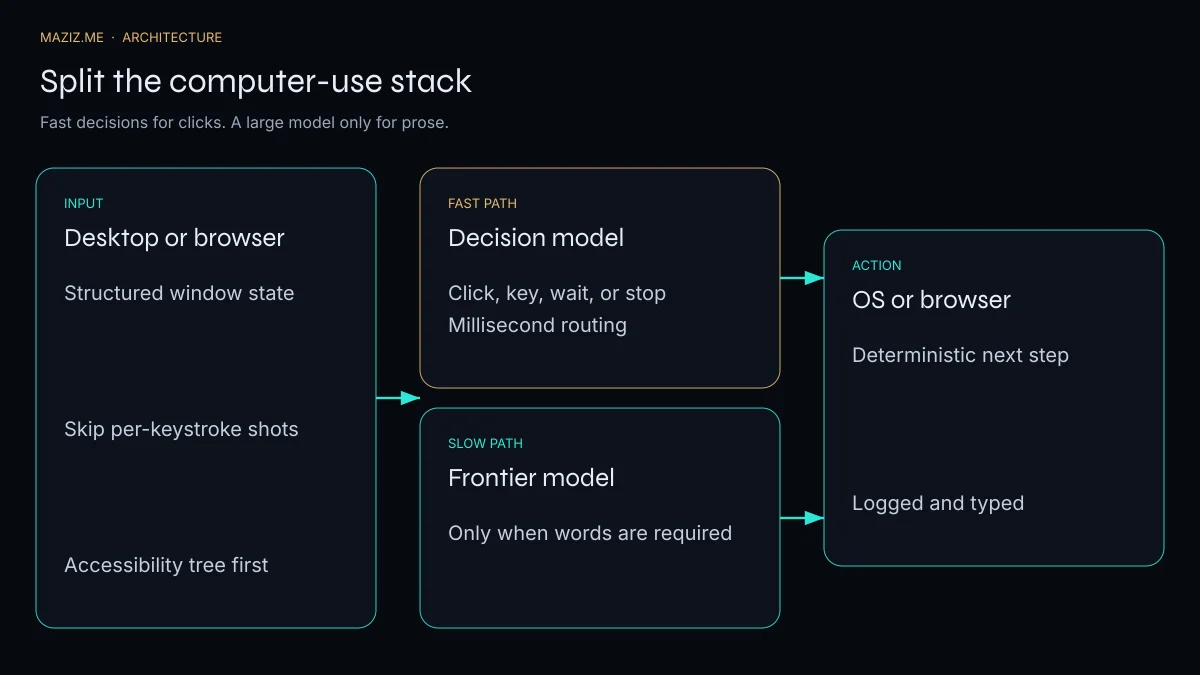
Draw two paths and make the gate explicit.
Fast path. State is a structured view of the UI: accessibility tree, DOM, window title, focused control, last action, and only the crop you need. A small decision model returns a typed action and a confidence score. Latency budget is tens to a few hundreds of milliseconds. If confidence is high, execute and log.
Slow path. Call the large model when the task asks for language: draft the email, explain the exception, write the commit message, or replan because the fast path abstained twice. The slow path may look at a screenshot. It should not be on the inner loop.
Shared log. Every action, typed or written, lands in one trace with the state that justified it. Without that, you cannot tell a bad click from a bad plan.
This is also a security boundary, not only a cost trick. The fast path should not hold long-lived credentials. How to keep tokens out of a desktop agent is covered in desktop agent security.
Operators in California and Florida who want browser or desktop automation usually already have a system of record: a CRM, an EHR, a dispatch tool. The agent should speak that system’s API when an API exists, and fall back to UI control only for the gap. I scope that as workflow automation: channel, tools, and an audit trail, remote from Lahore with Pacific and Eastern hours.
What fails when you do not split
Teams that keep one multimodal call on the inner loop see three failures, in order.
The first is latency. A 2–4 second “look at the screen” call cannot drive a UI that expects a click inside a second. Users think the agent froze. Operators in a California morning queue or a Florida midday rush will abandon it.
The second is parse failure. The model returns a sentence, a missing coordinate, or a click on a control that scrolled away. You then add a repair prompt, which is another frontier call, which is how a 12-step task becomes 40 billed requests.
The third is un-debuggable success. When the same model both planned and clicked, a wrong click has no type. You cannot count “abstained,” “wrong control,” and “right control, stale DOM” as separate rates. A typed fast path makes those rates ordinary metrics. A prose path makes them a screenshot review.
If an API exists for the system of record, call it. UI control is the exception for the screen that has no API, not the default architecture. That single rule removes more risk than a smarter screenshot model.
The state you should actually send
A full-screen screenshot is a convenient lie. It looks like “everything the user sees,” and it is also the most expensive, least typed object you can put on the inner loop. Most clicks do not need pixels. They need the control tree: the focused window, the role and name of the control under the pointer, whether it is enabled, and the short list of actions that control accepts. An accessibility tree, a DOM snapshot with roles, or a window list is state. A 4K bitmap of the whole desktop is a research demo.
Send the tree first. Send a crop only when the tree is lying — a canvas, a game, a custom-drawn control with no name. Even then, crop to the window, not the monitor. And do not send that crop on every keystroke. Key repeat is not a planning problem. If the fast model’s only job is “the next action is type, click, wait, or stop,” it should be looking at a diff of the tree since the last action, not re-reading the wallpaper.
This is the same contract as Jev: predefined questions, a primitive answer, a confidence rating. Open reproductions such as APUS OpenJev matter here because they let you test that contract without putting a frontier multimodal call on the hot path. They do not remove the need to measure your own latency. A millisecond router that is actually 800 milliseconds is just a smaller bill for the same stall.
A click budget for one real task
Pick a task your operators already do: export a report, file a ticket, copy three fields from a portal that has no API. Count the actions a careful person takes. That count is the budget. Every action is either a typed decision or a prose step. Prose steps should be rare. “Write the customer a two-sentence note” is prose. “Click Export, choose CSV, click Save” is not.
Log the action, the control id, the confidence, and whether a human later undid it. After a hundred runs you will see the real split. If ninety percent of frontier calls were “which button is Export,” you have been renting a writer to do a pointing job. If the undo rate on the fast path is high, the question set is wrong, or the tree is stale, or you are clicking through a scroll position you did not re-read. Those are fixable. A blurry screenshot and a paragraph that says “I clicked something” is not.
For a California morning queue or a Florida midday rush, the stall is the product defect. People do not wait four seconds between clicks inside a tool they already know. The architecture has to respect that even when the model is clever.
Where the large model still earns its price
Keep the frontier model for the work that is actually language. Draft the email. Summarize the thread. Explain a policy exception. Decide that the user’s request is ambiguous and should be asked back in words. Then hand control back to the fast path for the clicks that follow.
Do not let the large model emit mouse coordinates “just in case.” Coordinates from prose are how you get a click on a control that moved. The fast path owns the pointer. The slow path owns the sentence. If a task needs both, the harness alternates them on purpose, and the log shows which one ran. That boundary is also the boundary you will want when you lock down desktop agent permissions: the component that can click should not be the component that can read a credential file because a web page asked it to.
If an API exists, call it and skip the UI. Computer use is the exception for the screen that has no interface you are allowed to call. Teams that invert that — UI first, API later — pay screenshot prices for a problem a request would have solved.
Key attributes and checklist
- List actions the fast path may emit. Anything else is a slow-path or a human.
- Prefer the accessibility tree or DOM over a full screenshot. Use pixels when the tree lies.
- Put a confidence threshold in config, not in a prompt.
- Cap fast-path steps per task so a confused agent cannot click for an hour.
- Snapshot state before each action so a failure is replayable.
- Bill the frontier model per prose call, and alert when that rate spikes.
- Never store passwords in the agent’s working directory. Scoped grants only.
If your “agent” is one prompt that both decides and writes, you will debug it as folklore. Split the types and the traces, then the failures get names.
One task, drawn as two lanes
Take “file this invoice in the portal, then tell the customer it is received.” Lane one is the portal. The fast model sees the accessibility tree, chooses the next control, and stops when the confirmation control has been pressed or when confidence drops. It never writes the customer note. Lane two is the note. The frontier model receives the structured result — invoice id, amount, timestamp — and writes two sentences. It never receives a screenshot, and it never returns a click.
Between the lanes, a small piece of ordinary code checks types. The fast path must return one of the actions you listed. The slow path must return text under a length cap, with the invoice id present. If either check fails, the task stops and a person gets the trace. That stop is a feature. A computer-use demo that “keeps trying” through a failed type check is how a wrong click becomes a paid click.
Write the budget before the first run. A reasonable starting point is a cap on fast-path steps and a cap of one prose call. If the task needs more prose, it is a different task and it should be designed as one, not discovered by a retry loop at 2 a.m. Log the caps next to the outcome so the next person can see whether you are failing because the model is weak or because the budget is a fantasy.
Operators notice the difference in the pauses. Typed steps should feel like a script. The prose step is allowed to feel like writing, because it is writing. When every step feels like writing, you have not split the stack. You have put a slow model in a loop and given it a mouse.
Frequently asked questions
What is a decoupled computer-use agent?
It is a desktop or browser agent split into a fast decision model for navigation and a large language model that runs only when the task needs written language.
Why is a full-screen screenshot on every click expensive?
Each frame is a large multimodal prompt. At interactive rates you pay latency and tokens for decisions that were a closed set: click, type, scroll, wait, or stop.
Does decoupling remove the need for a frontier model?
No. It reserves the frontier model for prose, planning that is genuinely open-ended, and recovery when the fast model’s confidence is low.
A Florida dispatch desk and a California back office have the same failure mode: an agent that chats about the screen instead of acting on a known control. If that is the system you are trying to replace, start with the action list, not with a model leaderboard.